
cannot open source input file的解决方法
- 原创
- |
- 浏览:69116
- |
- 更新:
- |
- 标签:外语学习
![cannot open source input file的解决方法]() 1
1![cannot open source input file的解决方法]() 2
2![cannot open source input file的解决方法]() 3
3![cannot open source input file的解决方法]() 4
4


CMSIS\stm32f10x.h(8297): error: #5: cannot open source input file "stm32f10x_conf.h": No such file or directory
Lib\src\misc.c(24): error: #5: cannot open source input file "misc.h": No such file or directory
Lib\src\stm32f10x_rcc.c(23): error: #5: cannot open source input file "stm32f10x_rcc.h": No such file or directory
Lib\src\stm32f10x_gpio.c(23): error: #5: cannot open source input file "stm32f10x_gpio.h": No such file or directory
方法/步骤
首先打开keil软件,并且打开了相关工程,打开如图所示的设置按钮;
![cannot open source input file的解决方法]()
- 相关内容未经授权抓取自百度经验
选择如图所示界面,点击添加文件路径。
![cannot open source input file的解决方法]()
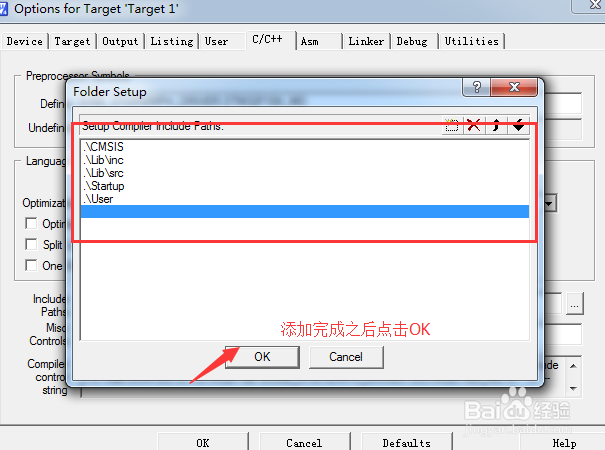
开始一个一个的添加文件路径。
![cannot open source input file的解决方法]()
添加完成,如图所示。点击OK
![cannot open source input file的解决方法]()
编译运行,错误解决。
END


经验内容仅供参考,如果您需解决具体问题(尤其法律、医学等领域),建议您详细咨询相关领域专业人士。
作者声明:本篇经验系本人依照真实经历原创,未经许可,谢绝转载。
展开阅读全部